Menu from YAML
A menu is a set of device settings: target temperature, hysteresis, fan thresholds. On idryer-core, the menu is described by a single file menu.yaml, while everything else — C++ structures, storage in non-volatile memory (NVS), and publication to the portal — is generated automatically.
This is one of the key blocks of the core. You do not write code for storing settings or invent a format for the portal — you only list parameters in YAML.
Why a menu
After the previous steps, the device reads sensors, but all thresholds are hard-coded. The menu solves three tasks at once:
- storage: values survive a reboot (NVS);
- control from the portal: the portal shows every menu item by its type (number, switch);
- single source of truth: one file describes both memory and interface.
How it works
A single menu.yaml file is processed by a generator during build:
The portal draws every menu item by its type. role: gives an item a translated label from the core contract; an item without role: is shown with its title.
Do not edit generated files
The files menu_state.*, menu_bindings.*, menu_ids.h, and others are created by the generator. Edit only menu.yaml and rebuild — otherwise your changes will be overwritten.
An item's constant name is built simply: MENU_ plus its id in capitals. The item target_temp gives MENU_TARGET_TEMP, hysteresis gives MENU_HYSTERESIS. These constants will be needed in chapter 7.
Step 1. Copy the template
The library includes a menu template. Copy it to your project:
Step 2. Enable generation during build
Copy the hook sample from the iDryer-Storage project (you can use it as-is, no configuration needed):
mkdir -p extra_scripts
cp path/to/iDryer-Storage/extra_scripts/pre_gen_menu.py extra_scripts/pre_gen_menu.py
Then in platformio.ini, add -Isrc/menu to the [env:cabinet] section (so the code can see #include <menu_state.h>) and connect the hook via extra_scripts:
[env:cabinet]
; ... platform / board / lib_deps from chapter 4 — unchanged ...

build_flags =
    -Isrc/menu                      ; ← added: path to generated menu
    -DIDRYER_API_BASE='"https://portal.idryer.org/api"'
    -DMQTT_BROKER='"mqtt.idryer.org"'
    -DMQTT_PORT=8883
    -DMQTT_USE_TLS=1

extra_scripts =                     ; ← added
    pre:extra_scripts/pre_gen_menu.py
The hook will find the generator automatically at lib/idryer-core/menu/menu_gen.py, so the library must be connected via lib/ (symlink or copy), as described in chapter 4. PlatformIO runs the generator with its own Python — nothing needs to be installed separately. If the build still fails at this step, show the error text to the community: Telegram, Discord.
Step 3. Describe cabinet parameters
Open src/menu/menu.yaml. The template already includes a root item root with an array children and example parameters. Remove the examples (my_param, my_flag, my_mode_group) and add your own inside children. Keep the last two items — units_count and language — in place: these are fixed contracts with the portal.
A basic cabinet needs only a few parameters.
Target storage temperature:
- id: target_temp
  type: value
  role: storage.target_temperature   # label from the core contract
  title: { ru: "ТЕМПЕРАТУРА", en: "TARGET TEMP" }
  unit:  { ru: "°C", en: "°C" }
  vtype: uint16
  min: 30
  max: 50
  step: 1
  bind: target_temp            # NVS key (≤ 15 characters)
  persist: true
  scope: global
  default: 45
Hysteresis (how many degrees the temperature can drop below target before heating turns on again):
- id: hysteresis
  type: value
  title: { ru: "ГИСТЕРЕЗИС", en: "HYSTERESIS" }
  unit:  { ru: "°C", en: "°C" }
  vtype: uint8
  min: 1
  max: 5
  step: 1
  bind: hysteresis
  persist: true
  scope: global
  default: 2
role: is a closed list
The value of role: cannot be arbitrary — it must be from the canonical_roles list in the core contract. If no suitable role exists, the build will stop and show the list of allowed values. For a storage cabinet, roles from the storage.* family are suitable: storage.target_temperature, storage.target_humidity, storage.start, storage.stop. The full list is in the header of menu.template.yaml. role: is optional: a parameter without it (like hysteresis above) is stored and published the same way, only its label comes from title.
Restrictions that cannot be violated:
bind— no longer than 15 characters (NVS key limit);- do not add a
widget:field tomenu.yaml— the portal and the app do not read it: a menu item is drawn by its type.
Check the ignore_external_cmd item in the template
The template includes an ignore_external_cmd item whose bind is 19 characters, exceeding the 15-character limit. If left as-is, generation will fail: bind 'ignore_external_cmd' ... has 19 characters, limit 15. Either remove this item or shorten bind to ign_ext_cmd (as in real products). For a basic cabinet, you can simply delete it.
Step 4. Build the project and verify generation
During the build, the pre-hook will install dependencies (once) and generate C++ menu files. If menu.yaml has not changed, generation is skipped (up-to-date).
Verify that generation succeeded. The build log should show a message about menu generation, and the src/menu/ folder should contain generated files:
src/menu/
├── menu.yaml          # your file (source)
├── menu_state.h/.cpp  # menu object with all parameters
├── menu_bindings.*    # access by bind + write to NVS
├── menu_ids.h
└── menu_meta.h        # and others
If the build fails with a message about an unknown role: — the role is not in the canonical_roles list. Fix it and rebuild. Do not edit files marked autogen.
Step 5. Load the menu at startup
Connect the generated menu in src/main.cpp and load it in setup() — before s_link.begin():
#include <menu_state.h>      // menu object with all parameters
#include <menu_bindings.h>   // menu_sync_state_to_cache, menu_apply_by_bind

menu.initDefaults();         // set default values from YAML
menu.loadFromNVS();          // saved values; on first start the defaults are saved
menu_sync_state_to_cache();  // values into the cache the published menu is built from
After this, parameters are accessible through the global menu object:
Step 6. The menu on the portal: publish and accept changes
The portal does not read the menu from the device by itself: the firmware publishes it and applies the changes that come back. Three parts:
- publish —
menu_buildFullJson()from the core builds the menu JSON frommenu.yamland the current values;devicePublisher()->publishConfigRaw()sends it to the portal (MQTT topicconfig) and to the app over the local network; - when — when the device comes online and on the
get_configcommand: the portal sends it when you open the device menu (the gear on the card); - change — the portal sends
setwith the itemidand the new valueval.menu_apply_by_bind()writes the value tomenu, to NVS and to the cache, then the menu is published again and the portal shows the confirmed value.
Add after the includes:
#include <menu_commands.h>                   // menu_buildFullJson
#include <local_access/device_publisher.h>   // publishConfigRaw

static bool s_menuPending = false;   // publish the menu from loop()

static void publishMenu() {
    static char buf[MENU_FULL_JSON_BUF_SIZE];
    const size_t len = menu_buildFullJson(buf, sizeof(buf));
    if (len > 0) s_link.devicePublisher()->publishConfigRaw(buf, len);
}

static void applySet(JsonObjectConst data) {
    const int id = data["id"] | -1;
    float v = data["val"].is<bool>() ? (data["val"].as<bool>() ? 1.0f : 0.0f)
                                     : data["val"].as<float>();
    for (uint16_t i = 0; i < g_bindings_count; i++) {
        if ((int)g_bindings[i].id != id) continue;
        const MenuMeta& m = g_menu_meta[id];
        if (v < m.min_val) v = m.min_val;              // limits from menu.yaml
        if (v > m.max_val) v = m.max_val;
        menu_apply_by_bind(g_bindings[i].bind, v);     // menu + NVS + cache
        s_menuPending = true;                          // show the new value on the portal
        return;
    }
}
In setup(), after s_link.begin():
s_link.onCommand("get_config", [](JsonObjectConst) { s_menuPending = true; });
s_link.onCommand("set", [](JsonObjectConst data) { applySet(data); });
In loop(), after s_link.loop():
static bool s_wasOnline = false;
const bool online = s_link.isOnline();
if (online && !s_wasOnline) s_menuPending = true;   // just came online
s_wasOnline = online;
if (s_menuPending) {
    s_menuPending = false;
    publishMenu();
}
Why the menu is published from loop()
Command callbacks are called deep inside the network handler. Building the menu JSON there costs a lot of stack, so the callback only raises a flag, and loop() publishes.
applySet() clamps the value to min/max of the item from menu.yaml: the device does not trust an incoming number blindly.
Complete src/main.cpp after this chapter
Compared to the previous chapter, the lines marked // ← chapter 6 were added: loading the menu, publishing it and accepting changes.
What it looked like — src/main.cpp after chapter 5
#include <iDryer.h>
#include <Wire.h>
#include <math.h>
#include "Sht31ClimateSensor.h"
#include "demo_sensors.h"    // readings without sensors (-DDEMO_SENSORS=1)

static const iDryer::Config CFG = {
    .deviceType        = iDryer::DeviceType::Unknown,   // your own device: the card is built by the manifest
    .unitsCount        = 1,
    .hasAirTemp        = true,
    .hasAirHumidity    = true,
    .hasHeaterTemp     = true,
    .telemetryPeriodMs = 5000,
    .statusPeriodMs    = 10000,
    .hardwareVersion   = "1.0",
    .firmwareVersion   = "0.1.0",
    .model             = "DIY Storage Cabinet",
};
static iDryer::Link s_link(CFG);

static Sht31ClimateSensor s_climate(&Wire);
static bool               s_climateOk = false;

static const int   THERM_PIN  = 2;
static const float SERIES_R   = 4700.0f;
static const float NOMINAL_R  = 100000.0f;
static const float NOMINAL_T  = 25.0f;
static const float BETA       = 3950.0f;

static float readHeaterTempC() {
    int   raw = analogRead(THERM_PIN);
    float v   = (float)raw / 4095.0f;
    float r   = SERIES_R * (1.0f - v) / v;
    float tK  = 1.0f / (1.0f / (NOMINAL_T + 273.15f) + logf(r / NOMINAL_R) / BETA);
    return tK - 273.15f;
}

// Readings: sensors or, with -DDEMO_SENSORS=1, the cabinet model
static void readSensors() {
#ifdef DEMO_SENSORS
    demoSensors(s_link.telemetry);
#else
    if (s_climateOk) {
        s_climate.tick(millis());
        SensorReading r = s_climate.get();
        if (r.ok) {
            s_link.telemetry.airTempC[0]       = r.temperature;
            s_link.telemetry.airHumidityPct[0] = r.humidity;
        }
    }
    s_link.telemetry.heaterTempC[0] = readHeaterTempC();
#endif
}

void setup() {
    Serial.begin(115200);
    Wire.begin(8, 9);
    s_climateOk = s_climate.begin();
    s_link.begin();
    // The portal unlinked the device: erase the secret, wait for a new pairing.
    s_link.onCommand("revoke", [](JsonObjectConst) { s_link.handleRevoke(); });
}

void loop() {
    s_link.loop();

    readSensors();
}
#include <iDryer.h>
#include <Wire.h>
#include <math.h>
#include "Sht31ClimateSensor.h"
#include "demo_sensors.h"    // readings without sensors (-DDEMO_SENSORS=1)
#include <menu_state.h>                      // ← chapter 6: parameters (menu.target_temp …)
#include <menu_bindings.h>                   // ← chapter 6: menu_apply_by_bind
#include <menu_commands.h>                   // ← chapter 6: menu_buildFullJson
#include <local_access/device_publisher.h>   // ← chapter 6: publishConfigRaw

static const iDryer::Config CFG = {
    .deviceType        = iDryer::DeviceType::Unknown,   // your own device: the card is built by the manifest
    .unitsCount        = 1,
    .hasAirTemp        = true,
    .hasAirHumidity    = true,
    .hasHeaterTemp     = true,
    .telemetryPeriodMs = 5000,
    .statusPeriodMs    = 10000,
    .hardwareVersion   = "1.0",
    .firmwareVersion   = "0.1.0",
    .model             = "DIY Storage Cabinet",
};
static iDryer::Link s_link(CFG);

static Sht31ClimateSensor s_climate(&Wire);
static bool               s_climateOk = false;

static const int   THERM_PIN  = 2;
static const float SERIES_R   = 4700.0f;
static const float NOMINAL_R  = 100000.0f;
static const float NOMINAL_T  = 25.0f;
static const float BETA       = 3950.0f;

static float readHeaterTempC() {
    int   raw = analogRead(THERM_PIN);
    float v   = (float)raw / 4095.0f;
    float r   = SERIES_R * (1.0f - v) / v;
    float tK  = 1.0f / (1.0f / (NOMINAL_T + 273.15f) + logf(r / NOMINAL_R) / BETA);
    return tK - 273.15f;
}

// Readings: sensors or, with -DDEMO_SENSORS=1, the cabinet model
static void readSensors() {
#ifdef DEMO_SENSORS
    demoSensors(s_link.telemetry);
#else
    if (s_climateOk) {
        s_climate.tick(millis());
        SensorReading r = s_climate.get();
        if (r.ok) {
            s_link.telemetry.airTempC[0]       = r.temperature;
            s_link.telemetry.airHumidityPct[0] = r.humidity;
        }
    }
    s_link.telemetry.heaterTempC[0] = readHeaterTempC();
#endif
}

// ← chapter 6: menu on the portal
static bool s_menuPending = false;

static void publishMenu() {
    static char buf[MENU_FULL_JSON_BUF_SIZE];
    const size_t len = menu_buildFullJson(buf, sizeof(buf));
    if (len > 0) s_link.devicePublisher()->publishConfigRaw(buf, len);
}

static void applySet(JsonObjectConst data) {
    const int id = data["id"] | -1;
    float v = data["val"].is<bool>() ? (data["val"].as<bool>() ? 1.0f : 0.0f)
                                     : data["val"].as<float>();
    for (uint16_t i = 0; i < g_bindings_count; i++) {
        if ((int)g_bindings[i].id != id) continue;
        const MenuMeta& m = g_menu_meta[id];
        if (v < m.min_val) v = m.min_val;
        if (v > m.max_val) v = m.max_val;
        menu_apply_by_bind(g_bindings[i].bind, v);
        s_menuPending = true;
        return;
    }
}

void setup() {
    Serial.begin(115200);
    Wire.begin(8, 9);
    s_climateOk = s_climate.begin();
    menu.initDefaults();                     // ← chapter 6
    menu.loadFromNVS();                      // ← chapter 6
    menu_sync_state_to_cache();              // ← chapter 6
    s_link.begin();
    // The portal unlinked the device: erase the secret, wait for a new pairing.
    s_link.onCommand("revoke", [](JsonObjectConst) { s_link.handleRevoke(); });
    s_link.onCommand("get_config", [](JsonObjectConst) { s_menuPending = true; });   // ← chapter 6
    s_link.onCommand("set", [](JsonObjectConst data) { applySet(data); });           // ← chapter 6
}

void loop() {
    s_link.loop();

    // ← chapter 6: publish the menu on coming online and on request
    static bool s_wasOnline = false;
    const bool online = s_link.isOnline();
    if (online && !s_wasOnline) s_menuPending = true;
    s_wasOnline = online;
    if (s_menuPending) {
        s_menuPending = false;
        publishMenu();
    }

    readSensors();
}
Verify the result
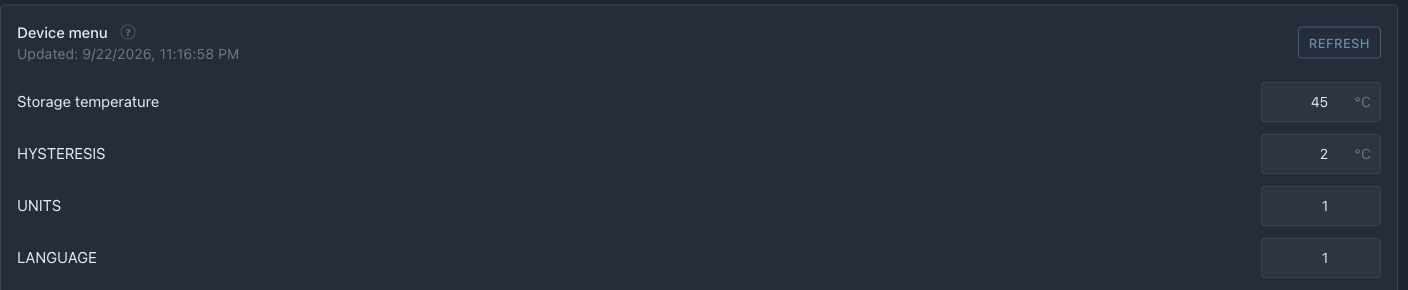 The menu came from the device: storage temperature and hysteresis with their limits. A value can be changed right here — the device accepts it, saves it and publishes the menu again.
After flashing:
- the gear on the device card opens the device page with the menu: the target temperature (the portal labels it by its role — "Storage temperature") and HYSTERESIS;
- change a value there — the device accepts it, saves it to NVS and publishes the menu again, and the portal shows the confirmed value;
- after a reboot the device publishes the saved values;
- internal parameters (hysteresis) are available in the code via
menu.
What's next
Settings are described and stored. Now let's connect them to hardware in Heating Control: the heater maintains the target temperature, the fan turns on at a threshold.