Heating control
On this page you connect sensors, settings, and power control into working logic. The device maintains a set temperature in the cabinet, protects the heater from overheating, and responds to commands from the portal.
Logic runs in loop() alongside network servicing. All timers and thresholds are non-blocking, without delay().
What should happen
Cabinet behavior follows three simple rules:
- Temperature maintenance. If the cabinet air is cooler than the target by the hysteresis value — turn on heating. When the target is reached — turn off.
- Heater protection. A thermistor monitors the heater itself. If it overheats beyond the limit — heating turns off regardless of air temperature.
- Fan. Turns on to distribute heat throughout the cabinet, and turns off when heating is not needed.
Heater and fan switches
The controller turns the heater and fan on and off through a switch: a MOSFET module (version A) or SSR (version B) — see Wiring Diagram. From the code perspective it is simply a GPIO pin: HIGH — on, LOW — off.
Describe such a switch with a small structure and create two instances — for the heater and fan. Add this to src/main.cpp (before setup()):
struct GpioOutput {
    int pin;
    void begin() { pinMode(pin, OUTPUT); digitalWrite(pin, LOW); }
    void on()    { digitalWrite(pin, HIGH); }
    void off()   { digitalWrite(pin, LOW); }
};

static GpioOutput myHeater{4};   // GPIO4 — heater control
static GpioOutput myFan{5};      // GPIO5 — fan control
Pin numbers are the same as in the Wiring Diagram. In setup() both switches must be initialized: myHeater.begin(); and myFan.begin();.
Safe state on startup
begin() immediately sets LOW — heater and fan are off until logic decides otherwise. This is important: when power is applied, the heater must not accidentally turn on.
Temperature maintenance by hysteresis
For a cabinet in the 40–45 °C range, simple hysteresis is sufficient: heating turns on and off around the target. This is simpler than full PID and works reliably for gentle heat maintenance.
Hysteresis is taken from the menu (menu.hysteresis) — it is already connected in chapter 6. The target temperature is set by the user when starting the cabinet from the device card (s_targetC; the card is connected later in this chapter). Heating works only in Storage mode. Add the state and the decision function:
static bool  s_heating = false;
static float s_targetC = 0.0f;   // target of the current run, from the card

static void controlLoop() {
    // Heat only in Storage mode: after Stop the cabinet cools down.
    if (s_link.status.mode[0] != iDryer::UnitMode::Storage) {
        s_heating = false;
        return;
    }
    float air    = s_link.telemetry.airTempC[0];     // SHT31
    float target = s_targetC;                        // from the card
    float hyst   = (float)menu.hysteresis;           // from menu

    if (air < target - hyst) {
        s_heating = true;     // cooled down — heating on
    } else if (air >= target) {
        s_heating = false;    // reached target — stop
    }
}
The target temperature comes with the start command from the card; its limits and default are the target_temp item of the menu.
Heater protection by thermistor
Air heats slowly, while the heater element heats quickly. Without separate control, the heater can overheat before the air reaches the target. Therefore, the heater thermistor sets a hard ceiling.
static const float HEATER_MAX_C = 80.0f;   // heater temperature ceiling

static void applyHeater() {
    float heaterTemp = s_link.telemetry.heaterTempC[0];   // thermistor

    bool allow = s_heating && heaterTemp < HEATER_MAX_C;

    if (allow) {
        myHeater.on();
        s_link.telemetry.heaterPower01[0] = 1.0f;   // reflect in telemetry
    } else {
        myHeater.off();
        s_link.telemetry.heaterPower01[0] = 0.0f;
    }
}
Heater ceiling is protection, not climate control
HEATER_MAX_C limits the heater element temperature, not the air. The value depends on heater design and enclosure materials. Choose it with margin below the temperature at which printed parts deform — see Heat-resistant materials.
For smoother heating instead of on/off switching, you can control power via PWM; the heaterPower01[0] field accepts values from 0.0 to 1.0. For a cabinet with gentle heat maintenance, the simple logic above is usually sufficient.
Fan
The fan distributes heat throughout the cabinet. The simplest logic is to turn it on with the heater:
static void applyFan() {
    bool fanOn = s_heating;          // spin while heating
    if (fanOn) myFan.on(); else myFan.off();
    s_link.telemetry.fanOn[0] = fanOn;   // reflect in telemetry
}
In the production controller, the fan is controlled by temperature with separate on and off thresholds (for example, turn on at 55 °C, turn off at 35 °C) to prevent chatter at the boundary. For a cabinet, the same approach can be applied by linking thresholds to menu parameters.
Putting it together in loop()
void loop() {
    s_link.loop();          // network and auto-publish

    // sensors (see "Sensors" step):
    s_climate.tick(millis());
    SensorReading c = s_climate.get();
    if (c.ok) {
        s_link.telemetry.airTempC[0]       = c.temperature;
        s_link.telemetry.airHumidityPct[0] = c.humidity;
    }
    s_link.telemetry.heaterTempC[0] = readHeaterTempC();

    controlLoop();   // decide whether to heat
    applyHeater();   // apply to heater + protection
    applyFan();      // apply to fan
}
Telemetry fields (heaterPower01, fanOn) are published by the facade itself — on the portal you can see whether the device is heating now and whether the fan is running.
Card: start and stop
Starting and stopping come from the device card on the portal and in the app. The firmware declares them as card actions: the core adds them to the card manifest, and the portal and the app draw the form and the buttons themselves. There is no command parsing in your code — the core calls your function.
 The card is assembled from the manifest: readings on the left, including heating power and the fan, and the form with the temperature and the start button on the right. The portal knew nothing about this device — everything came from the firmware.
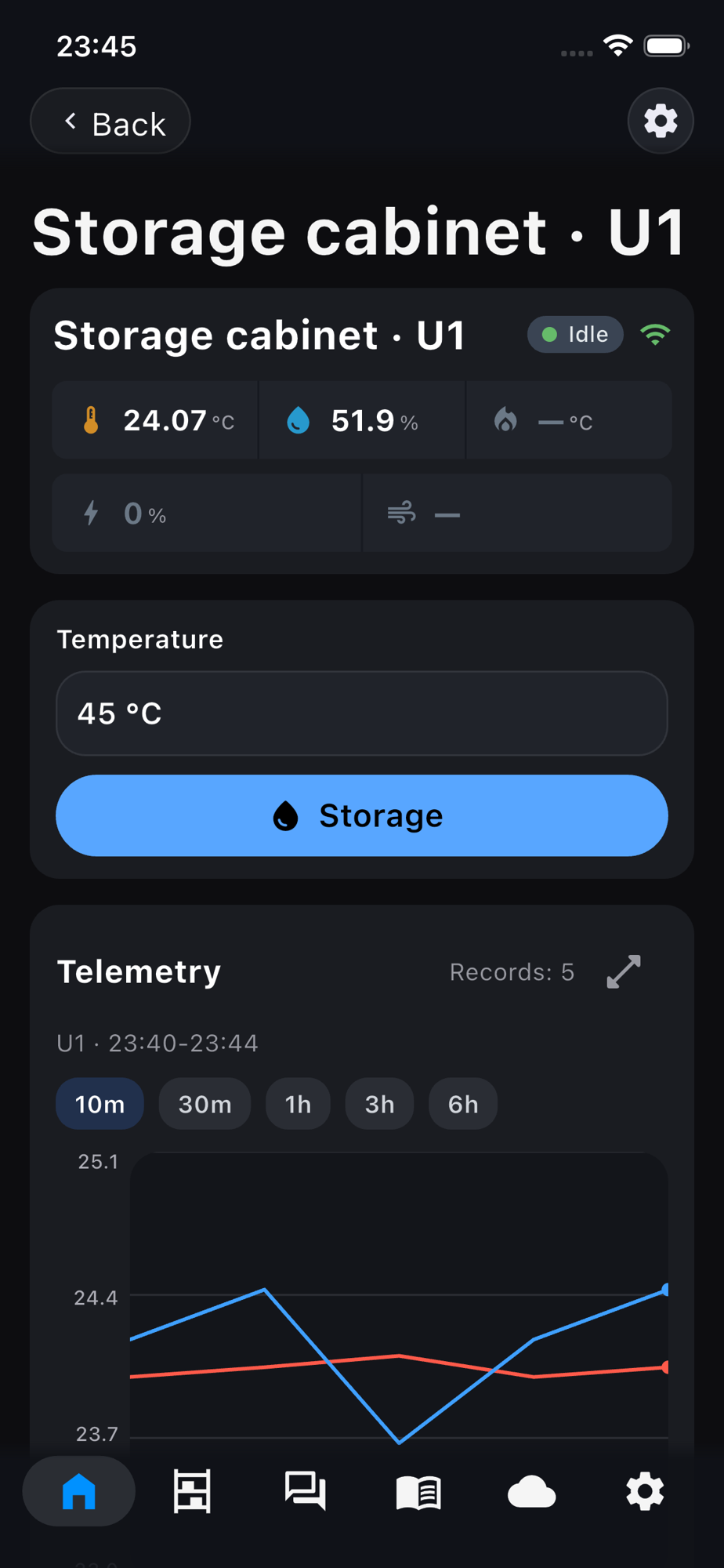 In the app it is the same and comes from the same manifest: readings, the temperature field and the start button.
The limits of the temperature field and its default are taken from the menu item target_temp (30–50 °C, 45) through the bridge card_menu_bridge.h. The value the user enters goes with the start command and is not written to the menu. Add the header next to the menu headers from chapter 6:
Action callbacks — before setup():
static void onStorage(uint8_t unit, JsonObjectConst args) {
    s_targetC = args["temperature"].as<float>();   // already within 30..50
    s_link.status.mode[unit]        = iDryer::UnitMode::Storage;
    s_link.status.targetTempC[unit] = s_targetC;
    s_link.publishStatusNow();
}

static void onStop(uint8_t unit, JsonObjectConst) {
    s_link.status.mode[unit]        = iDryer::UnitMode::Idle;
    s_link.status.targetTempC[unit] = 0.0f;
    s_link.publishStatusNow();
}
In setup(), after the menu commands from chapter 6, declare the actions. The menu values are already in the cache the card reads: setup() calls menu_sync_state_to_cache() since chapter 6.
auto& card = s_link.card();
idryer::card_menu::attach(card);
card.action("storage", "STORAGE", onStorage)
    .name("ru", "Хранение").name("en", "Storage")
    .param("temperature", "target_temperature", MENU_TARGET_TEMP);
card.action("stop", "IDLE", onStop)
    .name("ru", "Стоп").name("en", "Stop");
"STORAGE"and"IDLE"— the unit mode after the action. While the cabinet is idle, the card shows the start form; while the mode isSTORAGE, it shows the session block and the Stop button.MENU_TARGET_TEMP— the id of thetarget_tempitem; the generator puts it intomenu_ids.h.s_link.status.mode[0]andtargetTempC[0]show the current chamber state. CallpublishStatusNow()after each change so the card switches immediately.iDryer::UnitMode::Storage— gentle heat maintenance mode. This is the cabinet's primary mode.- Change the storage temperature in the device menu on the portal — the default of the card field follows it: the core notices the menu change and republishes the manifest itself.
The core adds to the card manifest:
"actions": [
  {"id": "storage", "mode": "STORAGE", "name": {"ru": "Хранение", "en": "Storage"}, "action": "card.storage",
   "params": [{"id": "temperature", "purpose": "target_temperature", "type": "number",
               "limits": [30, 50], "step": 1, "default": 45, "unit": "°C"}]},
  {"id": "stop", "mode": "IDLE", "name": {"ru": "Стоп", "en": "Stop"}, "action": "card.stop"}
]
On the portal, the card of the idle cabinet gets the Temp. field with 45 °C and the Storage button; after the start — the session block with the target and the Stop button. In the app, the home screen shows readings and the running session; start and stop are on the device page. Sensors, fields and layout of the card are covered in the Device card chapter of the air filter section.
No delay() in the callbacks
Action callbacks are called from the network handler. Any blocking inside breaks the MQTT session. Change the target and the status, do the actual work in loop().
Complete src/main.cpp after this chapter
This is the final, complete file for the device. Lines new relative to the previous chapter are marked // ← chapter 7. This same file is available as a ready example in the example/09-cabinet/ folder of the repository and builds with the command pio run -e cabinet.
What it was — src/main.cpp after chapter 6
#include <iDryer.h>
#include <Wire.h>
#include <math.h>
#include "Sht31ClimateSensor.h"
#include "demo_sensors.h"    // readings without sensors (-DDEMO_SENSORS=1)
#include <menu_state.h>                      // ← chapter 6: parameters (menu.target_temp …)
#include <menu_bindings.h>                   // ← chapter 6: menu_apply_by_bind
#include <menu_commands.h>                   // ← chapter 6: menu_buildFullJson
#include <local_access/device_publisher.h>   // ← chapter 6: publishConfigRaw

static const iDryer::Config CFG = {
    .deviceType        = iDryer::DeviceType::Unknown,   // your own device: the card is built by the manifest
    .unitsCount        = 1,
    .hasAirTemp        = true,
    .hasAirHumidity    = true,
    .hasHeaterTemp     = true,
    .telemetryPeriodMs = 5000,
    .statusPeriodMs    = 10000,
    .hardwareVersion   = "1.0",
    .firmwareVersion   = "0.1.0",
    .model             = "DIY Storage Cabinet",
};
static iDryer::Link s_link(CFG);

static Sht31ClimateSensor s_climate(&Wire);
static bool               s_climateOk = false;

static const int   THERM_PIN  = 2;
static const float SERIES_R   = 4700.0f;
static const float NOMINAL_R  = 100000.0f;
static const float NOMINAL_T  = 25.0f;
static const float BETA       = 3950.0f;

static float readHeaterTempC() {
    int   raw = analogRead(THERM_PIN);
    float v   = (float)raw / 4095.0f;
    float r   = SERIES_R * (1.0f - v) / v;
    float tK  = 1.0f / (1.0f / (NOMINAL_T + 273.15f) + logf(r / NOMINAL_R) / BETA);
    return tK - 273.15f;
}

// Readings: sensors or, with -DDEMO_SENSORS=1, the cabinet model
static void readSensors() {
#ifdef DEMO_SENSORS
    demoSensors(s_link.telemetry);
#else
    if (s_climateOk) {
        s_climate.tick(millis());
        SensorReading r = s_climate.get();
        if (r.ok) {
            s_link.telemetry.airTempC[0]       = r.temperature;
            s_link.telemetry.airHumidityPct[0] = r.humidity;
        }
    }
    s_link.telemetry.heaterTempC[0] = readHeaterTempC();
#endif
}

// ← chapter 6: menu on the portal
static bool s_menuPending = false;

static void publishMenu() {
    static char buf[MENU_FULL_JSON_BUF_SIZE];
    const size_t len = menu_buildFullJson(buf, sizeof(buf));
    if (len > 0) s_link.devicePublisher()->publishConfigRaw(buf, len);
}

static void applySet(JsonObjectConst data) {
    const int id = data["id"] | -1;
    float v = data["val"].is<bool>() ? (data["val"].as<bool>() ? 1.0f : 0.0f)
                                     : data["val"].as<float>();
    for (uint16_t i = 0; i < g_bindings_count; i++) {
        if ((int)g_bindings[i].id != id) continue;
        const MenuMeta& m = g_menu_meta[id];
        if (v < m.min_val) v = m.min_val;
        if (v > m.max_val) v = m.max_val;
        menu_apply_by_bind(g_bindings[i].bind, v);
        s_menuPending = true;
        return;
    }
}

void setup() {
    Serial.begin(115200);
    Wire.begin(8, 9);
    s_climateOk = s_climate.begin();
    menu.initDefaults();                     // ← chapter 6
    menu.loadFromNVS();                      // ← chapter 6
    menu_sync_state_to_cache();              // ← chapter 6
    s_link.begin();
    // The portal unlinked the device: erase the secret, wait for a new pairing.
    s_link.onCommand("revoke", [](JsonObjectConst) { s_link.handleRevoke(); });
    s_link.onCommand("get_config", [](JsonObjectConst) { s_menuPending = true; });   // ← chapter 6
    s_link.onCommand("set", [](JsonObjectConst data) { applySet(data); });           // ← chapter 6
}

void loop() {
    s_link.loop();

    // ← chapter 6: publish the menu on coming online and on request
    static bool s_wasOnline = false;
    const bool online = s_link.isOnline();
    if (online && !s_wasOnline) s_menuPending = true;
    s_wasOnline = online;
    if (s_menuPending) {
        s_menuPending = false;
        publishMenu();
    }

    readSensors();
}
#include <iDryer.h>
#include <Wire.h>
#include <math.h>
#include "Sht31ClimateSensor.h"
#include "demo_sensors.h"    // readings without sensors (-DDEMO_SENSORS=1)
#include <menu_state.h>
#include <menu_bindings.h>
#include <menu_commands.h>
#include <local_access/device_publisher.h>
#include <card/card_menu_bridge.h>        // ← chapter 7

static const iDryer::Config CFG = {
    .deviceType        = iDryer::DeviceType::Unknown,   // your own device: the card is built by the manifest
    .unitsCount        = 1,
    .hasHeater         = true,     // ← chapter 7
    .hasFan            = true,        // ← chapter 7
    .hasAirTemp        = true,
    .hasAirHumidity    = true,
    .hasHeaterTemp     = true,
    .telemetryPeriodMs = 5000,
    .statusPeriodMs    = 10000,
    .hardwareVersion   = "1.0",
    .firmwareVersion   = "0.1.0",
    .model             = "DIY Storage Cabinet",
};
static iDryer::Link s_link(CFG);

static Sht31ClimateSensor s_climate(&Wire);
static bool               s_climateOk = false;

static const int   THERM_PIN  = 2;
static const float SERIES_R   = 4700.0f;
static const float NOMINAL_R  = 100000.0f;
static const float NOMINAL_T  = 25.0f;
static const float BETA       = 3950.0f;

static float readHeaterTempC() {
    int   raw = analogRead(THERM_PIN);
    float v   = (float)raw / 4095.0f;
    float r   = SERIES_R * (1.0f - v) / v;
    float tK  = 1.0f / (1.0f / (NOMINAL_T + 273.15f) + logf(r / NOMINAL_R) / BETA);
    return tK - 273.15f;
}

// Readings: sensors or, with -DDEMO_SENSORS=1, the cabinet model
static void readSensors() {
#ifdef DEMO_SENSORS
    demoSensors(s_link.telemetry);
#else
    if (s_climateOk) {
        s_climate.tick(millis());
        SensorReading r = s_climate.get();
        if (r.ok) {
            s_link.telemetry.airTempC[0]       = r.temperature;
            s_link.telemetry.airHumidityPct[0] = r.humidity;
        }
    }
    s_link.telemetry.heaterTempC[0] = readHeaterTempC();
#endif
}

static bool s_menuPending = false;

static void publishMenu() {
    static char buf[MENU_FULL_JSON_BUF_SIZE];
    const size_t len = menu_buildFullJson(buf, sizeof(buf));
    if (len > 0) s_link.devicePublisher()->publishConfigRaw(buf, len);
}

static void applySet(JsonObjectConst data) {
    const int id = data["id"] | -1;
    float v = data["val"].is<bool>() ? (data["val"].as<bool>() ? 1.0f : 0.0f)
                                     : data["val"].as<float>();
    for (uint16_t i = 0; i < g_bindings_count; i++) {
        if ((int)g_bindings[i].id != id) continue;
        const MenuMeta& m = g_menu_meta[id];
        if (v < m.min_val) v = m.min_val;
        if (v > m.max_val) v = m.max_val;
        menu_apply_by_bind(g_bindings[i].bind, v);
        s_menuPending = true;
        return;
    }
}

// ← chapter 7: heater and fan switches
struct GpioOutput {
    int pin;
    void begin() { pinMode(pin, OUTPUT); digitalWrite(pin, LOW); }
    void on()    { digitalWrite(pin, HIGH); }
    void off()   { digitalWrite(pin, LOW); }
};
static GpioOutput myHeater{4};
static GpioOutput myFan{5};

// ← chapter 7: temperature maintenance logic
static bool        s_heating    = false;
static float       s_targetC    = 0.0f;
static const float HEATER_MAX_C = 80.0f;

static void controlLoop() {
    if (s_link.status.mode[0] != iDryer::UnitMode::Storage) { s_heating = false; return; }
    float air    = s_link.telemetry.airTempC[0];
    float target = s_targetC;
    float hyst   = (float)menu.hysteresis;
    if (air < target - hyst)  s_heating = true;
    else if (air >= target)   s_heating = false;
}

static void applyHeater() {
    float heaterTemp = s_link.telemetry.heaterTempC[0];
    bool  allow = s_heating && heaterTemp < HEATER_MAX_C;
    if (allow) myHeater.on(); else myHeater.off();
    s_link.telemetry.heaterPower01[0] = allow ? 1.0f : 0.0f;
}

static void applyFan() {
    if (s_heating) myFan.on(); else myFan.off();
    s_link.telemetry.fanOn[0] = s_heating;
}

// ← chapter 7: card actions
static void onStorage(uint8_t unit, JsonObjectConst args) {
    s_targetC = args["temperature"].as<float>();
    s_link.status.mode[unit]        = iDryer::UnitMode::Storage;
    s_link.status.targetTempC[unit] = s_targetC;
    s_link.publishStatusNow();
}

static void onStop(uint8_t unit, JsonObjectConst) {
    s_link.status.mode[unit]        = iDryer::UnitMode::Idle;
    s_link.status.targetTempC[unit] = 0.0f;
    s_link.publishStatusNow();
}

void setup() {
    Serial.begin(115200);
    Wire.begin(8, 9);
    s_climateOk = s_climate.begin();
    myHeater.begin();              // ← chapter 7
    myFan.begin();                 // ← chapter 7
    menu.initDefaults();
    menu.loadFromNVS();
    menu_sync_state_to_cache();
    s_link.begin();
    // The portal unlinked the device: erase the secret, wait for a new pairing.
    s_link.onCommand("revoke", [](JsonObjectConst) { s_link.handleRevoke(); });
    s_link.onCommand("get_config", [](JsonObjectConst) { s_menuPending = true; });
    s_link.onCommand("set", [](JsonObjectConst data) { applySet(data); });

    auto& card = s_link.card();                          // ← chapter 7
    idryer::card_menu::attach(card);
    card.action("storage", "STORAGE", onStorage)
        .name("ru", "Хранение").name("en", "Storage")
        .param("temperature", "target_temperature", MENU_TARGET_TEMP);
    card.action("stop", "IDLE", onStop)
        .name("ru", "Стоп").name("en", "Stop");
}

void loop() {
    s_link.loop();

    static bool s_wasOnline = false;
    const bool online = s_link.isOnline();
    if (online && !s_wasOnline) s_menuPending = true;
    s_wasOnline = online;
    if (s_menuPending) {
        s_menuPending = false;
        publishMenu();
    }

    readSensors();

    controlLoop();   // ← chapter 7
    applyHeater();   // ← chapter 7
    applyFan();      // ← chapter 7
}
Checking the result
 Right after the start: Storage mode, target 45 °C, power 100 %, fan on, the timer is running.
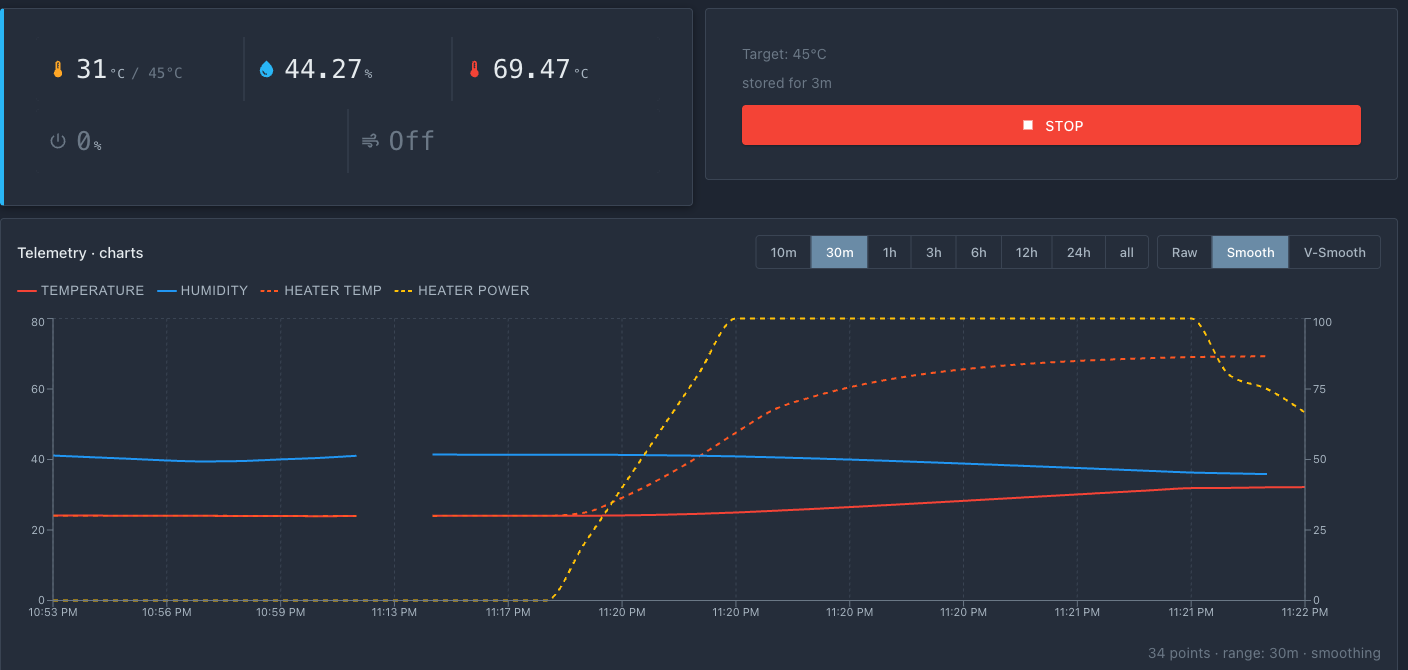 After three minutes: the air in the cabinet has warmed up, humidity has dropped, the heater has reached its working temperature. The chart shows how the power switches on and off by hysteresis.
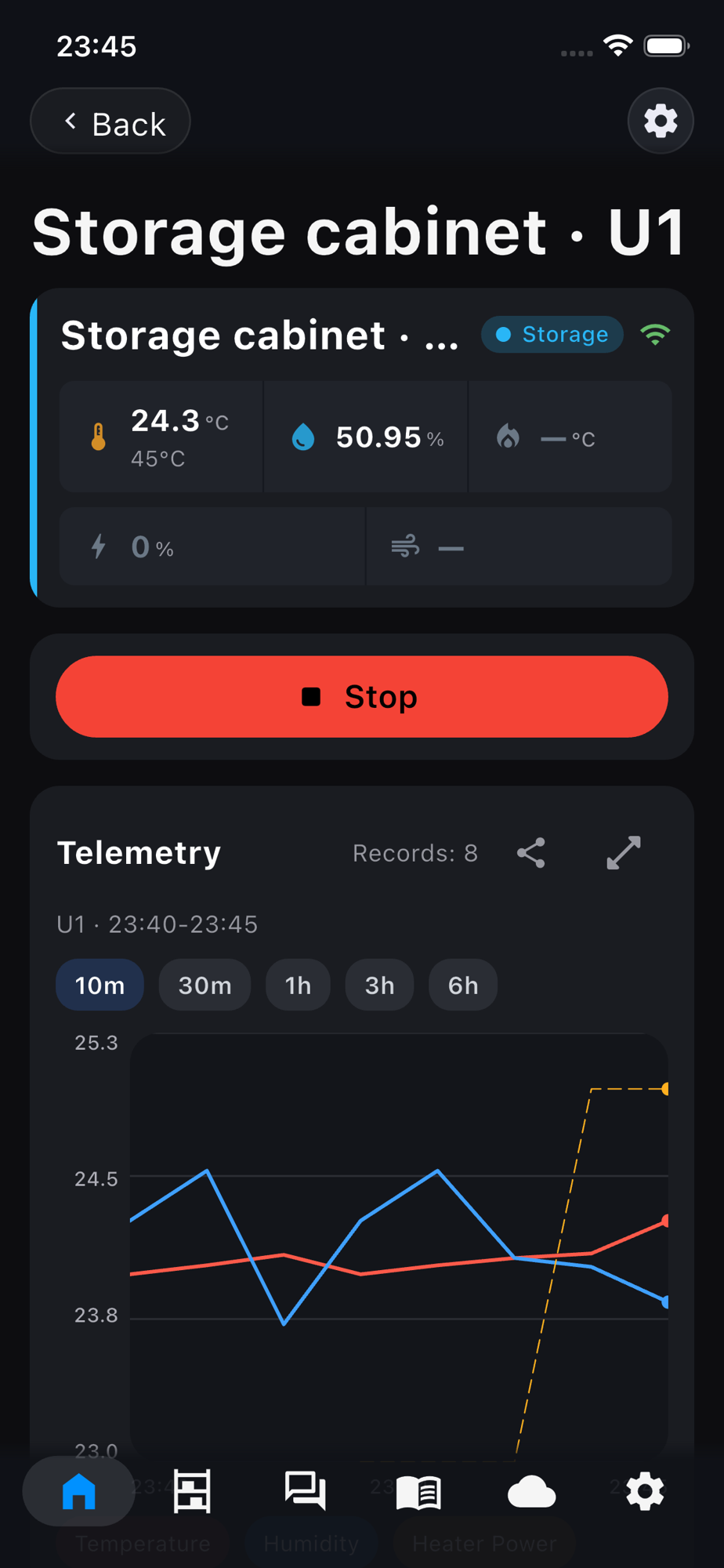 Storage can also be started from the app: a "Stop" button and a timer appear.
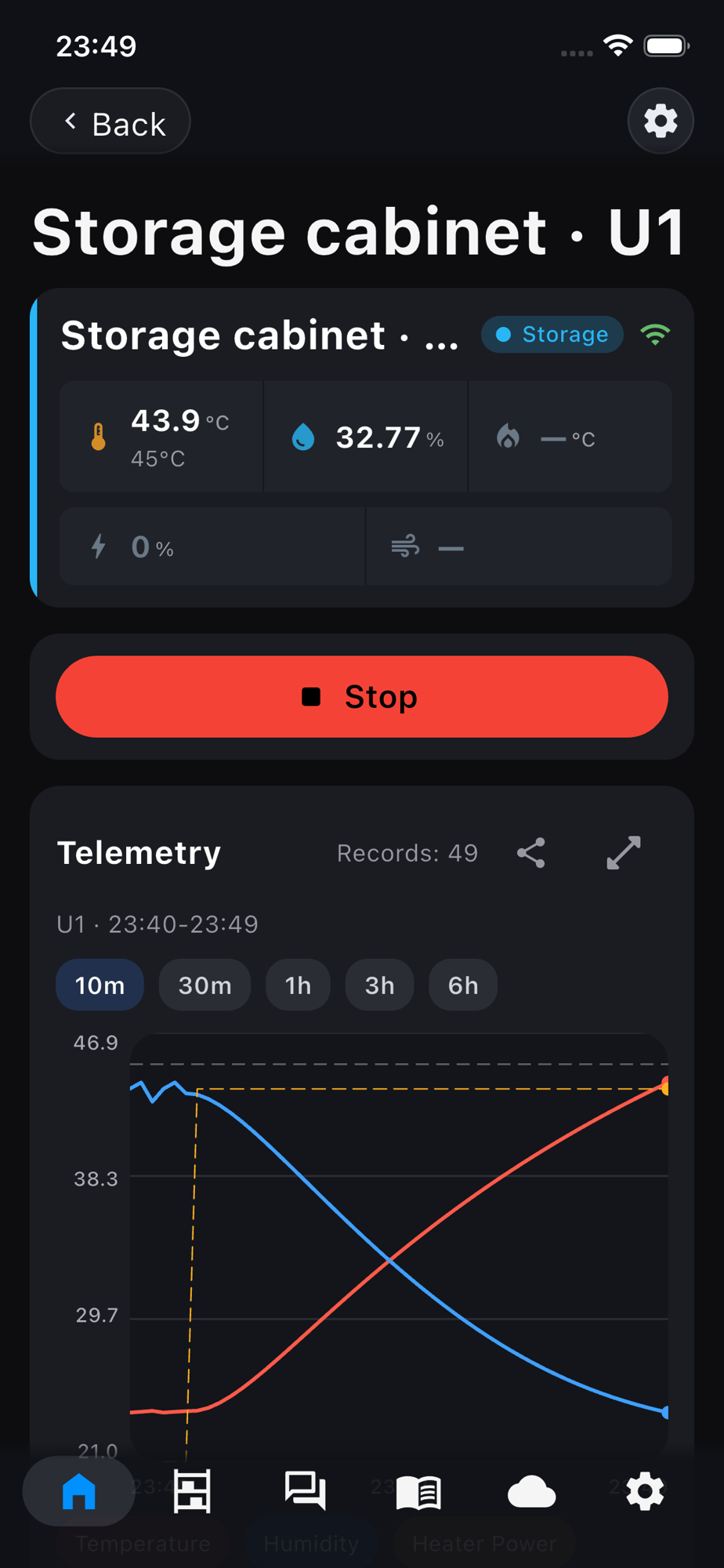 After three minutes in the app: 43.9 of 45 °C, humidity down from 51 to 33 %. On the chart the temperature goes up and the humidity goes down.
After this step:
- the
Storagebutton on the device card puts the cabinet in Storage mode with the entered temperature, the device begins heating; - air temperature approaches the target and stays within the hysteresis range;
- heater does not exceed
HEATER_MAX_C; - fan and heater power are visible in telemetry;
- the
Stopbutton turns off heating and switches to Idle; the cabinet does not heat until the next start.
What's next
Logic is ready. It remains to assemble the device into the enclosure and test under power — Assembly and check.