Firmware
This document provides instructions for building and flashing the Katapult bootloader for the iHeater microcontroller. Katapult allows firmware updates for Klipper via USB, and also includes guidance for installing Klipper firmware onto the iHeater controller.
Requirements
- STM32F042F6P6
- iHeater board
- ST-Link V2 programmer (for the initial flash) or USB cable
- Linux system (e.g., Raspberry Pi or printer)
If you're unable to compile and flash firmware directly on the printer
Building Katapult
- Clone the Katapult repository:
-
In
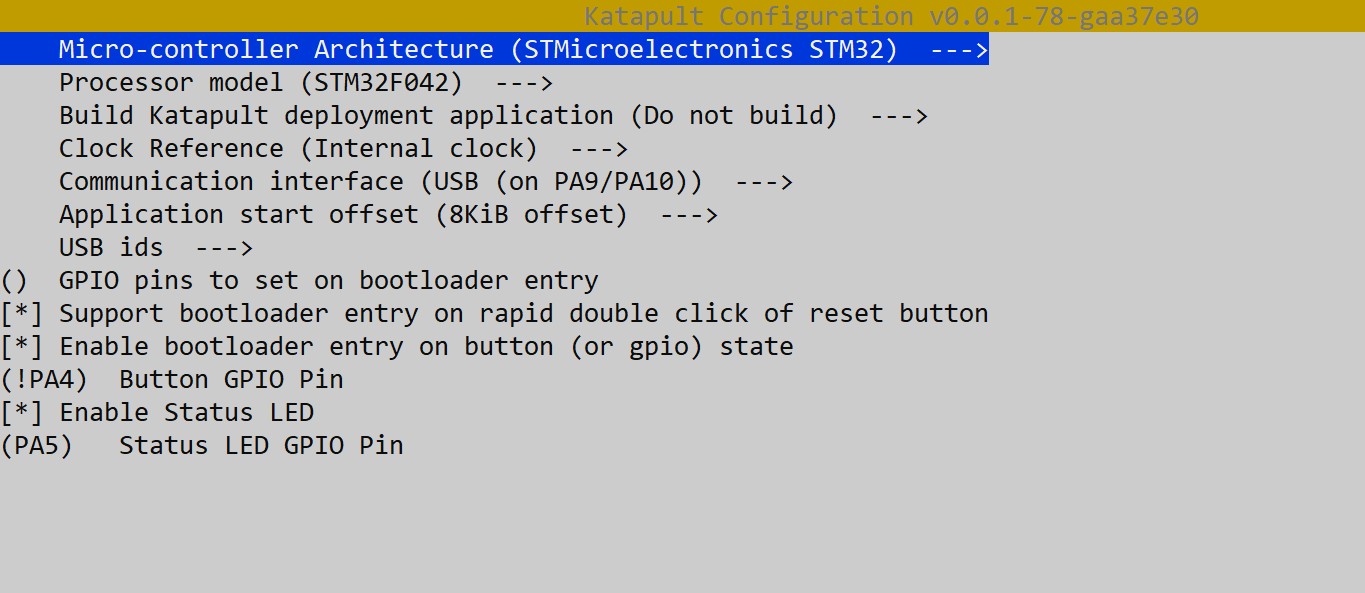
menuconfig, choose: -
MCU Architecture: STM32
- Processor model: STM32F042
- Clock Reference: Internal
- Communication interface: USB (on PA9/PA10)
- Application start offset: 8KiB offset
- Support bootloader entry on rapid double click of reset button
- Enable bootloader entry on button (or gpio) state
- (!PA4) Button GPIO Pin
- Enable Status LED
- (PA5) Status LED GPIO Pin
- Build:
The firmware will be generated in out/katapult.bin.
Flashing Katapult via DFU
This step is required only once to load the Katapult bootloader.
Preparation:
Install dfu-util if it's not already installed:
Set the BOOT0 jumper and power cycle the board (or press RESET). The microcontroller will enter DFU mode.
Check the connection:
You should see:
Flashing Katapult:
Execute:
Successful flash output:
Downloading to address = 0x08000000, size = 4968
Download        [=========================] 100%         4968 bytes
Download done.
File downloaded successfully
Transitioning to dfuMANIFEST state
Remove the jumper, hold the MODE button, press and release RESET (or replug USB).
After reboot:
You should see:
If you encounter permission errors:
Notes
- Katapult occupies the first 8KB of Flash, so 8KiB offset must be specified in Klipper.
- You can enter DFU using either double reset or a GPIO button (PA4).
- PA13/PA14 are used for SWD.
- After Katapult is flashed, ST-Link is no longer needed; future updates can be done via USB.
Installing Firmware to iHeater
Compiling Firmware
In the configuration menu select:
Enable extra low-level configuration options

Micro-controller Architecture (STMicroelectronics STM32)

Processor model (STM32F042)

Bootloader offset (8KiB bootloader)

Clock Reference (Internal clock)

Communication interface (USB (on PA9/PA10))
Disable all unused options:
[*] Support micro-controller based ADC (analog to digital)
[ ] Support communicating with external chips via SPI bus
[ ] Support communicating with external chips via I2C bus
[*] Support GPIO based button reading
[ ] Support Trinamic stepper motor driver UART communication
[ ] Support 'neopixel' type LED control
[ ] Support measuring fan tachometer GPIO pins
    *** LCD chips ***
[ ] Support ST7920 LCD display
[ ] Support HD44780 LCD display
    *** External ADC type chips ***
[ ] Support HX711 and HX717 ADC chips
Save and exit the menu.
Compile the firmware
!!! The output should be:
Installing Firmware to iHeater Board
Install python3-serial if needed
The following steps assume Katapult bootloader is already installed
-
Connect iHeater to the host in programming mode (hold Mode while plugging in USB or double press RESET).
-
Find the device:
You should see something like:
- Install flashtool if needed:
- Replace with your device ID and run:
python3 ~/katapult/scripts/flashtool.py -d /dev/serial/by-id/usb-katapult_stm32f042x6_XXXXXXXXXXXXXXXXXXXXXXXX-XXXX -f ~/klipper/out/klipper.bin
Expected output:
Flashing '/home/pi/klipper/out/klipper.bin'...

[##################################################]

Write complete: 20 pages

Verifying (block count = 319)...

[##################################################]

Verification Complete: SHA = 8A3DDF39A0E70B684DC6BAF74EF8F089EBDD6C18

Flash Success
- Verify:
Output should be:
iHeater is now ready for use with Klipper